About the Author

Executive Summary
Standing up a lakehouse in Microsoft Fabric is genuinely straightforward. A competent analytics engineer can provision a workspace, connect an operational data source, and publish a basic report in an afternoon. That accessibility is Fabric’s greatest strength — and the origin of its most common failure mode.
Keeping a lakehouse trustworthy is a different discipline entirely. Once data from your ERP, CRM, or other systems of record flows into OneLake and is shared across an organization, three questions arrive that the initial build never answered:
- Who owns this data?
- How do we know a report is using the correct version?
- How do we enforce access control across a lakehouse that is shared / democratized by design?

This whitepaper addresses the governance layer that most Fabric implementations defer until it becomes painful to retrofit. It covers four disciplines in depth: cataloging, lineage and classification through Microsoft Purview; workspace and domain security design including row-level security and environment separation; automated data-quality monitoring built with Fabric notebooks and alerting; and the organizational change management without which the first three decay.
This guidance is deliberately source-system agnostic. The patterns apply whether your operational data originates in a cloud ERP, a long-standing on-premises system, a CRM platform, a manufacturing execution system, or a combination of all of them. Where a specific ingestion mechanism matters, this paper describes the class of mechanism rather than a single vendor’s feature.
The governing principle throughout: tools do not govern…people, roles, and enforced practice do. Fabric provides an unusually complete set of governance capabilities, but capability is not control. This paper is written for teams who already run Fabric in production or are considering adoption of Microsoft’s unified data platform, and now need to make it defensible.
1. The Easy Party Versus The Real Challenge
The speed of initial delivery in Fabric creates a structural problem. Because a working lakehouse can be produced in a short period of time, governance is rarely part of the first sprint. By the time the platform matters enough to govern, it already contains dozens of items, several audiences, and at least one report that leadership relies on. Retrofitting controls at that point is markedly more expensive than building them in.
1.1 The Questions That Arrive later

Ownership
When a number is wrong, who is accountable? In most immature implementations that honest is “whoever built it,” which is not an operating model.

Version and correctness
Multiple lakehouse tables and semantic models accumulate with similar names. Consumers cannot distinguish the authoritative dataset from an experiment.

Access
OneLake is shared by design. Without deliberate control, the default trajectory is over-permissioning — every analyst a Contributor, every workspace open to a broad group.

Freshness and quality
Nobody notices that last night’s source-system load failed until a director asks why revenue dropped to zero.

Traceability
An auditor asks how a figure in a board report derives from the system of record, and no one can produce the chain.
1.2 Why Deferral Is Expensive
Governance retrofitted onto a sprawling estate costs several multiples of governance designed in. Access models must be re-derived from undocumented grants. Classification must be applied to data already copied into unknown locations. Lineage must be reconstructed from memory. Most damaging, trust — once lost through a visible data error — takes far longer to rebuild than any technical remediation requires.
1.3 A Note On Source Systems
Operational systems differ enormously in how they expose data: some offer native change-data-capture or managed replication into a lakehouse, others require scheduled extracts, and older systems may only permit database reads against a replica. These differences affect ingestion engineering, but they have remarkably little effect on the governance disciplines that follow. Ownership, classification, access control, and quality monitoring are the same problems regardless of whether the data originated in a modern SaaS ERP or a thirty-year-old mainframe.
2. The Governance Layer Most Teams Skip
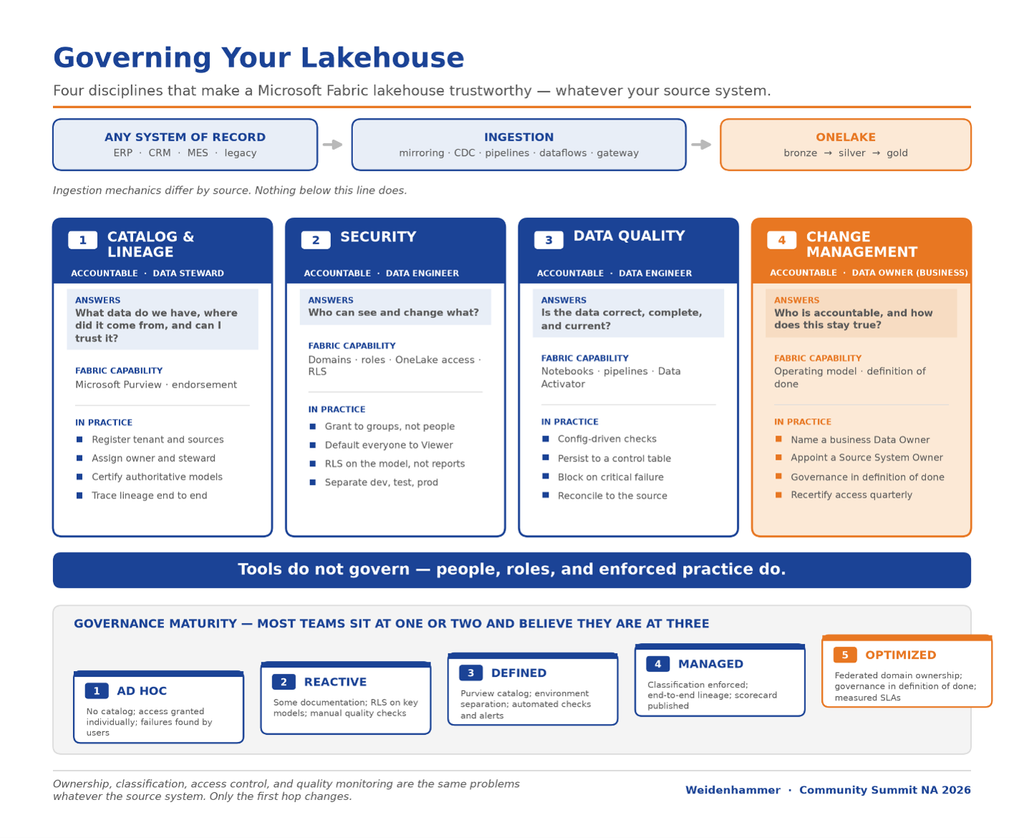
Governance in a Fabric lakehouse rests on four disciplines. Three are technical; the fourth determines whether the other three survive.
| Discipline | Questions It Answers | Primary Fabric Capability |
|---|---|---|
| Catalog & lineage | What data do we have, where did it come from, and can I trust it? | Microsoft Purview integration, endorsement |
| Security | Who can see and change what? | Domains, workspace roles, OneLake data access roles, RLS |
| Data Quality | Is the data correct, complete, current? | Notebooks, pipelines, Data Activator |
| Change Management | Who is accountable, and how does this stay true? | Operating model, ownership, definition of done |
These sit on top of the lakehouse holding your operational data. A useful diagnostic: if you cannot name the accountable owner for reach of the four in your organization, you do not yet have governance, instead you have capability.
3. Part one: Catalog, lineage, and classification
Everything begins with knowing what you have and where it came from. Without a catalog, security and quality efforts have no defined scope. A corporate data catalog also establishes the business logic definition for your organizations calculations and metrics.
3.1 Why Purview Alongside Fabric
Fabric surfaces its own items well: a workspace lists its lakehouses, warehouses, and semantic models, and provides a built-in lineage view within the workspace. That is sufficient for a single team and insufficient for an enterprise. Microsoft Purview extends governance across the estate:
- Tenant-wide and cross-system catalog. One catalog spanning Fabric, your ERP and CRM platforms, Azure data sources, on-premises databases, and third-party systems — not just what lives in one workspace.
- Automated discovery and classification. Scanning identifies assets and detects sensitive data patterns without manual inventory.
- Business glossary. Formal definitions of business terms, linked to the physical assets that implement them, resolving the perennial “what counts as revenue” dispute.
- Lineage beyond the workspace boundary. Tracing from the operational source system through ingestion, storage, and modeling to the final report.
- Live integration. Fabric items flow into the Purview data map, so the catalog reflects reality rather than a stale inventory.

The principle: governance should travel with the data, not with the tool. Data that moves between Fabric and other platforms should carry its classification and ownership with it.
3.2 Establishing The Catalog
A workable implementation sequence:
- Register the Fabric tenant as a data source in Purview, along with the operational systems and integration layers feeding it.
- Configure scans on a schedule appropriate to the rate of change — typically daily for active development environments, weekly for stable production.
- Scope scans deliberately. Scanning everything produces noise; begin with the domains that matter and expand.
- Enrich with business context. Attach glossary terms, descriptions, and owners. An asset with a technical name and no description is discoverable but not usable.
- Assign owners and stewards at the asset or domain level. This is the step most often skipped and the one that makes the catalog actionable.
- Endorse trusted content. Use Fabric’s promoted and certified endorsements so consumers can distinguish authoritative datasets from experiments or sandboxes.
The practical goal is to eliminate the question “which table is the real one?” — the single most common symptom of an ungoverned lakehouse.
3.3 End-To-End Lineage: From System Of Record To Report
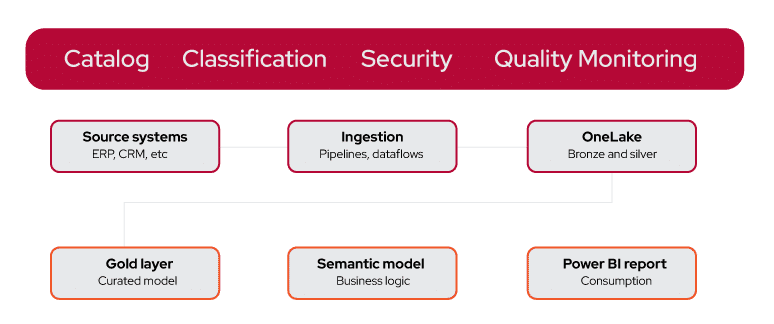
Lineage is the chain of custody for a number. A complete chain for operational data in Fabric typically reads:
- Operational source system — the ERP, CRM, or other system of record where the transaction originates.
- Integration or staging layer — the platform, replica, or API surface through which source data is exposed for analytics.
- Ingestion — managed replication, a dataflow, or a pipeline.
- Lakehouse (OneLake) — bronze and silver Delta tables.
- Curated layer — a gold lakehouse or warehouse holding dimensional models.
- Semantic model — the business logic, measures, and relationships.
- Power BI report — the artifact the business consumes.
Purview stitches these hops together, and the resulting graph supports two distinct and equally valuable operations:
- Root-cause analysis (upstream). A figure in a report looks wrong. Trace backwards to identify which table, pipeline, or source field produced it.
- Impact analysis (downstream). A source field is being deprecated or a column renamed — perhaps as part of an ERP upgrade. Trace forwards to enumerate every dataflow, model, and report affected before making the change.
Impact analysis is frequently the capability that justifies the governance investment to skeptical stakeholders, because it converts change management from guesswork into a checklist. It is especially valuable ahead of a major source-system upgrade or migration.
3.4 Practical Lineage Limitations
Be candid about gaps. Lineage is strongest where transformations are declarative and executed by recognized engines. It weakens when logic is buried in complex notebook code, when data moves via unmanaged exports, or when a spreadsheet sits between two systems. Two mitigations: prefer declarative transformation tools where practical, and treat any manual step in a critical chain as a defect to be engineered away.

3.5 Classifying Sensitive Data
Operational data is rich in personal and financial information — names, addresses, email addresses, payment terms, salaries, credit limits, national identifiers. Classification is therefore not optional in most regulatory contexts.

Sensitive labels
Microsoft Information Protection labels (for example, Confidential — Finance) can be applied to Fabric items and semantic models.

Automated classification
Purview scans detect common sensitive-data patterns and apply classifications, reducing reliance on manual tagging.

Label inheritance and persistence
Labels flow downstream through the Fabric estate and persist into Power BI exports — a labelled report exported to Excel carries its protection with it. This is the property that makes labelling meaningful rather than decorative.

Data loss prevention
DLP policies act on labels to block or warn on risky sharing, closing the gap between classification and enforcement.
Honor upstream classification
Where the source system already classifies data, mirror those designations rather than inventing a parallel scheme that will drift.
The operating rule: classify once, as close to the source as possible, and let enforcement follow the label everywhere. Classifying at the report layer is too late, because the data has already been copied.
4. Part Two: Designing The Security Model
- Tenant. Tenant-level settings control which capabilities are enabled and who may use them. Tenant admins should restrict features such as external sharing and service-principal access to defined groups rather than enabling them broadly.
- Domain. Domains group workspaces by business area (Finance, Sales, Supply Chain), enabling federated ownership and domain-level policy. Domains are the natural unit for delegating governance to the business.
- Workspace. The primary unit of access control and deployment. Most day-to-day permission decisions occur here.
- Item. Individual lakehouses, warehouses, semantic models, and reports can carry more granular permissions.
- Data. Within items, OneLake data access roles, row-level security, column-level security, and object-level security constrain what a permitted user actually sees.
4.2 Workspace Roles
| Role | Capability | Appropriate For |
|---|---|---|
| Admin | Full control including access management and deletion | A small, named platform team |
| Member | Add others, publish, and modify most content | Senior owners of the domain |
| Contributor | Create and edit content, cannot manage access | Developers and analysts who build |
| Viewer | Read published content only | The large majority of consumers |
Two rules carry most of the value.
1. Assign roles to security groups, never to individuals — individual grants become unmaintainable within months and survive employees’ departures. 2. Default every user to Viewer and require justification for elevation.
4.3 Least-Privilege Patterns
- Separate build from consume.
Contributors belong in development workspaces; production workspaces should contain almost no Contributors. - Use app audiences for distribution.
Publish Power BI apps with defined audiences rather than granting workspace access for report consumption. - Time-bound elevation.
Where privileged access is occasionally required, grant it through a group governed by privileged identity management with expiry, rather than permanently. - Quarterly access reviews.
Recertify group membership on a schedule, and automate joiner–mover–leaver processes through identity governance. - Treat every permission as attack surface.
The question is not “why should this person not have access?” but “what specifically requires that they do have access?”

4.4 OneLake Data Access Roles
Workspace roles are coarse: a Viewer on a workspace can generally read the lakehouse tables within it. Where a lakehouse contains data that not all workspace users should see, OneLake data access roles provide table- and folder-level control within the lakehouse itself, enforced regardless of the engine used to query. This matters because a user with SQL endpoint access could otherwise bypass restrictions applied only at the semantic model.
4.5 Row-Level Security
Row-level security ensures that a single shared model serves many audiences, each seeing only its own rows — by legal entity, region, business unit, or cost center. Implementation guidance:
- Define RLS on the semantic model, not per report. Roles defined once on the model apply to every report built over it. Report-level filtering is not a security control and can be removed by any user who can edit the report.
- Use dynamic RLS for scale. Rather than one static role per region, use a DAX filter based on the current user — for example, filtering a security dimension where the user principal name matches the logged-in user. This keeps role count constant as the organization grows.
- Maintain the mapping in data, not in DAX. Store the user-to-entity mapping as a table sourced from the operational system or an identity platform, so access changes require a data update rather than a model deployment.
- Mirror source-system entitlements where they exist. Many ERPs already restrict users by company, plant, or business unit. Deriving RLS from that existing entitlement data keeps analytics consistent with operational access and avoids a second, divergent security model.
- Test with “View as role.” Validate every role before publishing, and include RLS verification in your definition of done.
- Consider Direct Lake implications. RLS is enforced on the semantic model; ensure users cannot bypass it via direct lakehouse or SQL endpoint access. Pair model RLS with OneLake data access roles where that risk exists.
4.6 Column-Level And Object-Level Security
Row filtering is not always sufficient. Where specific attributes are sensitive — salary, national identifiers, margin — column-level security restricts visibility of the field itself, and object-level security can hide entire tables or measures from a role so they do not appear even in the field list. Use these to avoid the common workaround of maintaining parallel models for different audiences, which multiplies both cost and inconsistency.
4.7 Environment separation
Development, test, and production should be distinct workspaces with distinct access. This is a security control as much as a release-management practice: it prevents unfinished work from reaching consumers and prevents production data from being exposed in development.
- Deployment pipelines promote content between the three stages with deployment rules that repoint data sources per environment, so production never reads development data.
- Parameterize connections so the same artifact works in each environment without manual edits.
- Gate promotion with approvals, and restrict who may deploy to production.
- Scope credentials per environment. The identity that reads a source-system sandbox should not hold production permissions.
- Align to source-system environments. Most ERPs maintain their own development, test, and production instances. Map Fabric environments to them explicitly so a test model is never silently reading production transactions.
- Consider data in lower environments. Where production data cannot be used in development for privacy reasons, plan for masked or synthetic datasets rather than relying on informal restraint.
4.8 Identify, Service Principals, And Automation
Automated processes should authenticate as service principals or managed identities, never as a named individual’s account. Personal-account automation breaks when the person leaves, obscures audit trails, and typically carries excessive permissions. Grant each service principal only the workspace roles it needs, store secrets in a managed key vault, and rotate them on a defined schedule. Apply the same discipline to the integration account that reads from the source system — it is frequently the most over-permissioned identity in the estate.
4.9 Network and Tenant-Level Controls
For regulated environments, consider private endpoints to restrict access to the Fabric tenant from approved networks, conditional access policies requiring compliant devices or multifactor authentication, and tenant settings that disable export or external sharing for sensitive workspaces. Where the source system is on-premises, the data gateway becomes part of the security boundary and should be hardened, monitored, and clustered for resilience.
5. Part Three: Automated Data Quality Monitoring
Secure, well-catalogued data that is wrong is still worthless. Quality monitoring is the discipline that converts a lakehouse from a store into a dependable service.
5.1 What to Monitor
| Check | Detects | Typical Example |
|---|---|---|
| Freshness | Loads that did not run or arrived late | No sales-order rows loaded since yesterday |
| Row-Count / Volume | Partial loads or unexpected surges | Invoice volume 60% below the trailing average |
| Schema Drift | Added, removed, renamed, or retyped columns | A customized ERP field removed during an upgrade |
| Referential Integrity | Orphaned keys after partial syncs | Order lines referencing a missing customer |
| Uniqueness | Duplicate business keys | The same invoice ingested twice |
| Business Rules | Domain-specific violations | Negative quantities, or postings to a closed period |
| Reconciliation | Divergence from the system of record | Ledger balance differs from the ERP by period |
The objective is simple to state and difficult to sustain: catch the problem before the report does.
5.2 Implementing Checks With Fabric Notebooks
Fabric notebooks (PySpark or SQL) are the natural home for quality logic because they run inside the platform, against lakehouse tables, on the same capacity, with no external infrastructure.
Design guidance drawn from production implementations:
- Build a reusable check library. Write generic, parameterized functions — freshness, row-count deviation, null rate, uniqueness, drift — and call them per table with configuration, rather than writing bespoke code per table. A configuration-driven approach scales; copy-and-paste does not.
- Drive from a configuration table. Hold the table name, check type, thresholds, severity, and owning steward as data. Adding coverage for a new table then becomes a configuration row rather than a code change. This is also what makes the framework portable across source systems.

- Detect drift against a stored contract. Persist the expected schema and compare each run, flagging additions, removals, and type changes distinctly — an added column is usually benign, a removed one rarely is.
- Use statistical thresholds where fixed ones fail. Comparing row counts to a trailing average with a tolerance band handles seasonality far better than a fixed minimum.
- Keep quality logic in source control. Notebooks connected to Git receive the same review, versioning, and rollback as application code. Data quality is code.
5.3 Recording Results: The Control Table
Every check should write a row to a persistent results table capturing at minimum: run timestamp, table name, check type, result value, threshold, pass or fail, and severity. This history is what enables trend analysis (“this table has failed freshness nine times this month”), service-level reporting, and evidence for audit. Without persisted results you have alerts but no measurement, and therefore no way to demonstrate improvement.
5.4 Orchestration and Placement In The Pipeline
Checks belong immediately after ingestion and again after transformation to the curated layer. Run them as pipeline activities so they are part of the load, not a separate process that can silently stop.
Define severity tiers and act accordingly:

Critical
Halt the pipeline and prevent downstream semantic-model refresh. Publishing a known-bad number is worse than publishing yesterday’s number.

Warning
Continue, but alert the owning steward for review.

Informational
Record only, for trend analysis.
This “fail loudly, fail early” pattern — a circuit breaker on the data pipeline — is what prevents a quality issue from becoming a credibility issue.
5.5 Alerting With Data Activator
Detection without notification is merely logging. Data Activator monitors data conditions and triggers actions when thresholds are breached.
- Route to the accountable person — the owning steward for the domain, not a shared mailbox nobody reads.
- Deliver where work happens, typically a Teams channel for the data team plus email for critical failures.
- Include actionable context: which table, which check, expected versus actual, and a link to the run.
- Tune aggressively. Alert fatigue is the primary cause of monitoring failure. If an alert is routinely ignored, either fix the threshold or delete the alert.
5.6 Making Health Visible
Build a data-quality scorecard in Power BI over the control table, showing pass rates by domain, freshness status per critical table, and trends over time. Publish it to consumers, not only to the data team. A visible freshness indicator on a report — “data as of 06:15 today” — allows users to self-serve trust and dramatically reduces support queries.
The underlying principle: silence is not confidence. An absence of complaints indicates only that no one has noticed yet.
5.7 Reconciliation Against The SYstem Of Record
The strongest quality control is periodic reconciliation against the operational system: compare aggregate totals — transaction counts, ledger balances by period, open order value — between the source and the lakehouse, and report variance. Reconciliation catches classes of error that structural checks miss, particularly around incremental-load logic and deleted records, and it is the evidence finance leadership finds most persuasive.
Where the source system publishes its own control totals or period-close reports, use those as the comparison baseline. Agreeing the reconciliation definition with the business — which figures must tie, to what tolerance, and at what frequency — is as important as implementing the check.
5.8 Handling Deleted And Late-Arriving Data
Two source-system behaviors cause persistent quality problems and deserve explicit design:

Hard deletes
If the source physically removes records and your ingestion only appends or upserts, deleted rows linger in the lakehouse indefinitely, silently overstating totals. Where the source provides change tracking that emits deletes, consume it; where it does not, schedule periodic full-key comparisons to detect and reconcile removals.
Late-arriving and back-dated transactions
Many ERPs permit postings to prior periods. An incremental load keyed only on a modified timestamp will capture these correctly, but a load keyed on transaction date will not. Validate that your watermark logic reflects when the record changed, not when the business event occurred, and re-check closed periods on a schedule.
5.9 A Worked Example: Monitoring A Nightly Sales Load
To make the pattern concrete, consider a nightly synchronization of sales orders from an operational ERP into a lakehouse, feeding an endorsed semantic model and an executive revenue report.
- Configuration. A row in the check configuration table registers the SalesOrderHeader table with four checks: freshness (maximum age six hours), row-count deviation (tolerance 40% against a 28-day trailing average), schema contract, and uniqueness on the order number.
- Execution. The ingestion pipeline runs at 04:00. On completion it invokes the quality notebook, which reads the configuration, executes each registered check against the table, and writes one result row per check to the control table.
- Evaluation. Freshness passes. Row count comes in 62% below the trailing average — outside tolerance — and is flagged critical. The schema contract check confirms no structural change, ruling out an upstream field removal.
- Response. Because a critical check failed, the pipeline halts before refreshing the semantic model (perhaps even before data hits the gold layer). Yesterday’s validated data remains published rather than being overwritten with a partial load.
- Notification. Data Activator raises an alert to the sales domain steward in Teams, stating the table, the check, expected and actual values, and a link to the pipeline run.
- Diagnosis. The steward uses Purview lineage to trace upstream and finds the source extract was interrupted mid-run. The load is re-executed, checks pass, and the model refreshes.
- Outcome. The executive report was never wrong — it was briefly stale, with the delay visible on the freshness indicator. The control table records the incident for trend analysis.
This is the entire discipline in summary: configuration-driven checks, persisted results, severity-based blocking, routed alerting, and lineage-assisted diagnosis. Note that the failure was caught by a volume check rather than an error — the pipeline itself reported success.
6. Change Management: Making Governance Sustainable
OneLake deserves separate discussion here because it changes design assumptions that have held for years, and it is the component most likely to alter an architectural conclusion.
6.1 Roles And Accountabilities
| Role | Accountable For | Typically Held By |
|---|---|---|
| Data Owner | Domain policy, access approval, and the business definition of the data | A business leader in the domain |
| Data Steward | Classification, glossary terms, quality rules and thresholds | A senior analyst or subject expert |
| Data Engineer | Pipelines, RLS implementation, monitoring, and remediation | The platform or BI team |
| Source System Owner | Advance notice of schema and configuration changes upstream | The ERP or application team |
| Consumer | Using certified data and reporting suspected issues | Analysts and business users |
The critical appointment is the Data Owner, and it must be a business role rather than a technical one. When IT owns the definition of revenue, disputes escalate to people without authority to settle them.
The Source System Owner is the most commonly omitted role. Analytics teams are routinely surprised by upstream changes — a new mandatory field, a renamed code, a reconfigured chart of accounts — because no one told them. Establishing a standing channel between the application team and the data team prevents a large share of quality incidents before they occur.
6.2 Governance As Definition Of Done
Governance fails when treated as a separate project. It succeeds when embedded in the delivery process. A workable definition of done for any new data product:
- The asset is catalogued, described, and has a named owner and steward.
- Sensitivity classification has been applied.
- Access is granted to groups, with RLS implemented and tested where required.
- Quality checks exist for freshness, volume, and schema drift, with alerts routed to the steward.
- Lineage resolves end to end with no manual gaps.
- The artifact is in source control and promoted through the deployment pipeline.
- Reconciliation to the system of record has been agreed and implemented where the data is financially material.
- The semantic model is endorsed if it is intended as authoritative.
A checklist enforced at review is worth more than a policy document nobody reads.
6.3 Incident Response When Quality Fails
Failures are inevitable; the differentiator is a rehearsed response. Define the runbook before it is needed:
- Contain. Stop downstream propagation — halt refreshes and, where a bad figure has already published, annotate or unpublish the affected report rather than leaving it silently wrong.
- Communicate early. Tell consumers what is affected, what is not, and when to expect resolution. Users forgive delay far more readily than they forgive silence followed by a corrected number.
- Diagnose with lineage. Trace upstream to isolate the failing hop, and downstream to enumerate every affected model and report.
- Remediate and reprocess. Because bronze retains the raw copy, most issues can be corrected by reprocessing rather than re-extracting from the source system — which matters when extracts place load on a production ERP.
- Verify before reopening. Re-run the full check suite and reconcile against the source before declaring resolution.
- Conduct a blameless review. Ask why monitoring did not catch it earlier and add the missing check. Every incident should end with a new or tuned control.
Track mean time to detect and mean time to resolve for each incident. A program where detection time is falling is demonstrably working, and that trend is the most persuasive artifact available when requesting continued investment.
6.4 Coordinating With Source-System Change
Upstream change is the largest single source of downstream breakage. Establish three practices:
- Advance notification. The application team notifies the data team before schema, configuration, or master-data changes reach production.
- Impact assessment as a gate. Before an upstream change is approved, run Purview impact analysis and attach the affected-artifact list to the change record.
- Upgrade rehearsal. Major ERP upgrades should be run against a non-production Fabric environment first, with the full quality-check suite executed to surface schema drift before go-live.

6.5 Adoption Tactics That Work
- Start with one domain. Govern a single high-value area end to end and use it as the reference implementation. Attempting tenant-wide governance from the outset reliably stalls.
- Make the governed path the easy path. Provide workspace templates, a reusable check library, and pre-built RLS patterns so compliance is less work than circumvention.
- Publish the scorecard. Visible quality metrics create constructive peer pressure between domains.
- Celebrate a catch. When monitoring prevents a bad number reaching the board, publicize it. That story funds the next phase of investment.
- Review quarterly. Access recertification, threshold tuning, and catalog hygiene need a recurring forum with named attendees.
7. A Governance Maturity Model
| Level | Characteristics | Next Move |
|---|---|---|
| 1 — Ad hoc | No catalog; access granted individually; failures found by users | Assign owners; move access to groups |
| 2 — Reactive | Some documentation; RLS on key models; manual quality checks | Automate freshness and volume checks |
| 3 — Defined | Purview catalog; environment separation; automated checks with alerts | Add classification, lineage, and endorsement |
| 4 — Managed | Classification enforced; end-to-end lineage; quality scorecard published | Introduce SLAs and access recertification |
| 5 — Optimized | Federated domain ownership; governance in definition of done; measured SLAs | Continuous tuning and expansion |
Most organizations running Fabric in production sit at level one or two and believe they are at three. Assess honestly; the gap between having a capability and enforcing a practice is where risk accumulates.
8. A Ninety-Day Implementation Roadmap
8.1 Days 1-30: Establish The Foundation
- Select one high-value domain as the pilot and name its Data Owner, Steward, and Source System Owner.
- Inventory existing workspaces, items, and access grants; document what exists today.
- Convert individual permissions to security groups and demote unnecessary Contributors.
- Stand up dev, test, and production workspaces with a deployment pipeline, mapped to the corresponding source-system environments.
- Connect Purview and run an initial scan scoped to the pilot domain.
8.2 Days 31-60: Apply Controls
- Apply sensitivity labels to the pilot domain’s assets; enable relevant DLP policies.
- Implement and test RLS on the domain’s primary semantic model, derived from source-system entitlements where available.
- Build the reusable quality-check notebook library and the configuration and results tables.
- Add freshness, row-count, and schema-drift checks for the domain’s critical tables.
- Implement reconciliation against the system of record for financially material figures.
- Wire Data Activator alerts to the steward via Teams.
8.3 Days 61-90: Prove And Scale
- Publish the data-quality scorecard to consumers.
- Validate end-to-end lineage from the source system to the flagship report; close manual gaps.
- Endorse the authoritative semantic model as certified.
- Codify the governance definition of done and apply it to all new work.
- Establish the upstream change-notification channel with the application team.
- Run the first access recertification and hold a lessons-learned review.
- Select the second domain and repeat with the now-proven templates.
9. Anti-Patterns
- Governance as phase two. Deferred governance is retrofitted governance, at several times the cost.
- Report-level filtering as security. Filters applied in a report are cosmetic; any editor can remove them. Security belongs on the model and the data.
- Permissions granted to individuals. Unmaintainable within a year and a standing audit finding.
- One workspace for everything. No environment separation, no blast-radius control, no safe place to experiment.
- Bespoke quality code per table. Unmaintainable and inconsistently applied; build a parameterized library instead.
- Alerts to a shared mailbox. Alerts without an accountable individual are ignored by everyone equally.
- Classification applied at the report layer. By then the data has already been copied and exported.
- Automation running as a person. Breaks on departure, obscures audit, and usually over-permissioned.
- Ignoring upstream change. Treating the source system as static guarantees recurring, avoidable breakage.
- Reinventing entitlements. Building an analytics security model unrelated to the access rules already enforced in the operational system, producing two versions of the truth about who may see what.
- Boiling the ocean. Tenant-wide governance programs stall; domain-by-domain adoption compounds.
- Measuring nothing. Without a control table and scorecard there is no evidence of improvement and no basis for further funding.
10. Metrics For Governance
Governance programs that cannot demonstrate progress lose funding. Track a small, honest set:
- Catalog coverage. Percentage of production assets with an owner, description, and classification.
- Endorsement rate. Proportion of consumed semantic models that are certified or promoted.
- Quality pass rate. Percentage of checks passing, trended by domain.
- Freshness SLA attainment. Percentage of days critical tables met their agreed availability time.
- Reconciliation variance. Absolute and percentage difference between lakehouse and source-system control totals.
- Mean time to detect and to resolve. How quickly issues are found and fixed — the clearest evidence that monitoring works.
- Issues found by monitoring versus by users. The single most telling ratio; it should move decisively toward monitoring over time.
- Over-permissioned accounts. Count of users with Contributor or above in production.
11. Reference Architecture
A governed Fabric lakehouse for operational data, described layer by layer:
- Source. One or more systems of record — ERP, CRM, or line-of-business applications — exposed through their native replication, API, or replica database.
- Ingestion. Managed replication or mirroring where the source supports it; otherwise dataflows and pipelines, with an on-premises data gateway where required. Authenticated by service principals scoped per environment.
- Storage. OneLake, organized into domains, with bronze and silver layers in a lakehouse and a curated gold layer in a lakehouse or warehouse.
- Quality. Notebook-based checks executed as pipeline activities after ingestion and after curation, writing to a control table, with critical failures halting downstream refresh and periodic reconciliation to the source.
- Modeling. Certified semantic models in Direct Lake mode over the gold layer, with RLS, column-level and object-level security applied.
- Consumption. Power BI reports distributed through apps with defined audiences; consumers hold Viewer access only.
- Environments. Separate dev, test, and production workspaces mapped to source-system environments, promoted via deployment pipelines with parameterized connections and approval gates.
- Governance (cross-cutting). Purview for catalog, glossary, lineage, and classification; sensitivity labels with DLP; Data Activator for alerting; a published quality scorecard.
- Operations (cross-cutting). Git integration for source control, Capacity Metrics for consumption monitoring, quarterly access recertification, and a standing upstream change-notification channel.
12. Frequently Asked Questions
No. Ingestion mechanics differ by source, but cataloging, classification, access control, quality monitoring, and ownership are identical regardless of origin. Only Section 11’s ingestion layer changes.
The patterns still hold. You will rely on a data gateway and scheduled extracts rather than managed replication, and you should pay closer attention to delete handling and reconciliation, since older systems often lack reliable change tracking.
Conform keys in the silver layer, record the originating system as a column, and assign a Source System Owner per source. Lineage becomes more valuable, not less, as the number of sources grows.
Built-in lineage is adequate within a single workspace. Purview becomes necessary when you need cross-system lineage, enterprise-wide discovery, a business glossary, or audit-grade classification evidence.
Both, in most cases. Implement RLS on the semantic model for reporting, and add OneLake data access roles where users could otherwise reach the underlying tables directly.
Begin with the number of genuine business areas that have an identifiable owner — commonly three to six. Domains without an accountable owner add structure without governance.
Critical checks should. Publishing a known-bad number causes more damage than a delayed refresh, provided the delay is visibly communicated.
Yes, if ownership is federated to domains and the governed path is made easier than the alternative. Central teams should provide templates and tooling rather than perform all governance themselves.
Name accountable owners and stewards per domain. Every technical control depends on someone being answerable for it.
13. Glossary
- Certification (endorsement): A Fabric designation marking a semantic model or item as authoritative.
- Change data capture (CDC): A source-system mechanism that emits inserts, updates, and deletes as they occur.
- Control table: A persisted table recording data-quality check results over time.
- Data Activator: The Fabric capability that triggers alerts and actions when data conditions are met.
- Data gateway: The component enabling Fabric to reach on-premises or network-restricted sources.
- Data Owner: The business role accountable for a domain’s data, policy, and access approval.
- Data Steward: The role responsible for classification, glossary terms, and quality rules.
- Deployment pipeline: The Fabric mechanism for promoting content across dev, test, and production.
- Direct Lake: A semantic model mode reading Delta files directly from OneLake.
- DLP: Data loss prevention — policies that restrict risky sharing based on classification.
- Domain / sub-domain: A Fabric construct grouping workspaces by business area for federated ownership.
- Impact analysis: Using lineage to identify downstream artifacts affected by a proposed change.
- Lineage: The traceable chain from source system through transformation to consumed report.
- Medallion architecture: The bronze, silver, gold layering convention for progressive refinement.
- Object-level security (OLS): Hiding entire tables or measures from a role.
- OneLake data access roles: Table- and folder-level permissions enforced within a lakehouse.
- Purview: Microsoft’s governance service for cataloging, lineage, and classification.
- Reconciliation: Comparing aggregate totals between the source system and the lakehouse to prove agreement.
- Row-level security (RLS): Filtering rows by user so one model serves many audiences.
- Schema drift: Unexpected structural change in a source table.
- Sensitivity label: A Microsoft Information Protection classification that persists downstream.
- Service principal: A non-human identity used to authenticate automated processes.
- System of record: The operational application considered authoritative for a given business entity.
- Watermark: The stored marker indicating how far an incremental load has progressed.
14. Conclusion
Governance is the layer that converts a Fabric lakehouse from a technical achievement into a dependable business asset. It is not a single feature but four interlocking disciplines: a catalog with lineage and classification so people can find and trust data; a layered security model enforcing least privilege, row-level security, and environment separation; automated quality monitoring that detects problems before consumers do; and an operating model that assigns accountability and embeds governance in how work is delivered.
Critically, none of these disciplines depend on which operational systems your data comes from. Ingestion mechanics vary — managed replication for a modern cloud application, a gateway and scheduled extracts for an on-premises system — but the governance obligations are constant. An organization that builds these controls around one source system will find the framework transfers to the next with little more than new configuration rows.
Microsoft Fabric provides an unusually complete toolkit. Purview delivers enterprise cataloging and end-to-end lineage from the system of record to the published report. Domains, workspace roles, OneLake data access roles, and row-level security supply defense in depth. Notebooks, pipelines, and Data Activator make quality monitoring straightforward to automate. But none of these govern anything on their own. Governance is what an organization does, repeatedly and by default — not what its platform is capable of.
The pragmatic path is narrow and proven: pick one domain, name its owner and steward, apply all four disciplines end to end, publish the results, and use that reference implementation to scale. Attempting tenant-wide governance in a single program is the most reliable way to achieve none.
Recommended immediate action: select your pilot domain and name its Data Owner, Data Steward, and Source System Owner this week, then run the thirty-day foundation activities in Section 8.1 before adding any further workloads to the lakehouse.
Fabric and Purview capabilities evolve rapidly; verify current feature availability, licensing prerequisites, and regional support against Microsoft documentation before finalizing a design. Ingestion options vary by source system — confirm the replication, change-tracking, and connectivity capabilities of your own platforms before committing to an architecture.